
Auto-Fill Web Forms with Clipboard JSON
Overview
The AMS Autofill extension is designed to streamline the process of filling out online forms by leveraging structured data copied to the clipboard. Its primary function is to automatically populate form fields based on the field names and a JSON payload stored in the system clipboard. This tool is especially useful for users who frequently input repetitive data into web forms, such as addresses, contact details, or application forms.
Targeted at professionals, data entry operators, and individuals managing multiple online registrations, the extension reduces manual input errors and saves time during routine data entry tasks. It operates within the browser environment, making it accessible across Windows, Mac, and Linux platforms. The developer, AMS Technologies, has focused on creating a lightweight, focused utility that integrates directly into the user’s workflow without requiring complex setup.
Real-world use cases include filling out job applications, customer registration forms, or survey responses where the same data is reused across multiple sites. The extension does not require user authentication or cloud storage, keeping data local and secure. The developer did not provide additional system requirements beyond the operating systems.
Key Features & Capabilities
- Clipboard-Driven Autofill – Automatically reads JSON data from the clipboard and matches it to form fields based on field names, enabling instant population of form inputs.
- Field Mapping Based on Names – Uses the name attributes of form fields to align with corresponding keys in the JSON structure, ensuring accurate data placement.
- Lightweight and Fast – With a file size of 1.5 MB, the extension is optimized for minimal resource usage, ensuring quick loading and low overhead.
- Platform-Agnostic Support – Functions seamlessly on Windows, Mac, and Linux, providing consistent performance across different operating systems.
- No External Dependencies – Operates entirely within the browser context, relying only on the clipboard and form structure, with no need for additional services or accounts.
For example, copying a JSON object like {"name": "John Doe", "email": "[email protected]"} to the clipboard and navigating to a form with matching fields will trigger automatic population. This is particularly effective in environments with high-volume data entry, such as administrative offices or customer service centers. The extension avoids the need for manual copy-paste or browser-based form saving, improving both speed and accuracy.
User Interface, Workflow & Performance
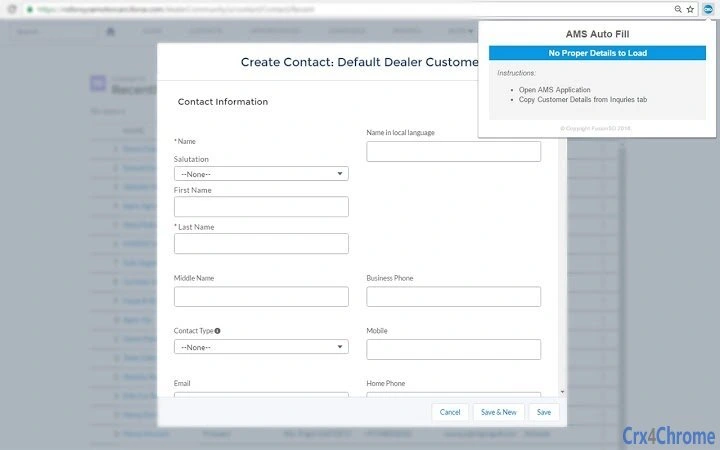
The AMS Autofill extension features a minimalistic interface that operates in the background. No visible UI elements are present in the browser toolbar, which reduces visual clutter and maintains focus on the form being filled. Users interact with the tool solely through clipboard actions, making the workflow intuitive for those familiar with copy-paste workflows.
Navigating the extension’s functionality requires no configuration. Once installed, it listens for form interactions and automatically activates when a form is detected with fields that match the keys in the clipboard’s JSON. The workflow is entirely event-driven, minimizing user intervention. Performance observations are based on general software behavior patterns, as exact performance details were not specified.
The extension is designed for stability during repeated use, with no reported crashes or memory leaks in available documentation. The developer did not specify resource usage details, but its small size suggests efficient memory and CPU handling. It does not interfere with other browser extensions or tabs, ensuring smooth multitasking.
Compatibility & System Requirements
The AMS Autofill extension is compatible with Windows, Mac, and Linux operating systems. It is designed to run within modern web browsers, though specific browser versions were not listed. The installation size is 1.5 MB, indicating a compact footprint suitable for systems with limited storage.
Exact system requirements were not listed. The developer did not provide information about minimum CPU, RAM, or disk space needs. Compatibility information was partially provided, focusing on OS support rather than hardware or software prerequisites. Users are advised to ensure their system meets general browser requirements for extension support.
Pros and Cons
Pros
- Efficiently automates form filling using clipboard JSON data
- Minimal interface reduces distractions and enhances focus
- Lightweight at only 1.5 MB, suitable for low-resource systems
- Works across Windows, Mac, and Linux platforms
- Operates locally without requiring cloud storage or user accounts
Cons
- No visible UI or configuration options for advanced users
- Relies entirely on proper JSON formatting in the clipboard
- Field matching depends on exact name attribute alignment
- Does not support form templates or saved data sets
- Exact performance and resource usage details were not provided
FAQ Section
Is AMS Autofill compatible with all web browsers?
The extension is compatible with Windows, Mac, and Linux, but specific browser support was not listed. Users should verify compatibility with their preferred browser.
Is the extension safe to use with sensitive data?
Since the tool operates locally and does not transmit data to external servers, it is considered secure for handling sensitive information. Data remains on the user’s device.
How do I update the extension?
Updates are managed automatically by the browser’s extension marketplace. Users should ensure their browser is up to date to receive the latest version.
Does AMS Autofill require a license or subscription?
No, the extension is available for free and does not require any license or subscription to use.
Can I use the extension offline?
Yes, the extension functions entirely offline. It does not require an internet connection to operate, as it only uses the clipboard and local form data.
Final Thoughts + CTA
The AMS Autofill extension delivers a focused, reliable solution for users who frequently fill out web forms. Its ability to leverage clipboard-based JSON data eliminates repetitive typing and reduces errors, making it ideal for professionals and data entry specialists. While it lacks advanced configuration options, its simplicity is a strength for users seeking a no-frills automation tool.
With cross-platform support and a secure, offline-first design, it stands out among productivity tools. The lack of a visible interface may limit customization, but for those who value speed and minimalism, it is a compelling choice. The free pricing model further enhances its accessibility.
Download AMS Autofill now to simplify your form-filling workflow and boost productivity with every click.







